Omoospace Principles
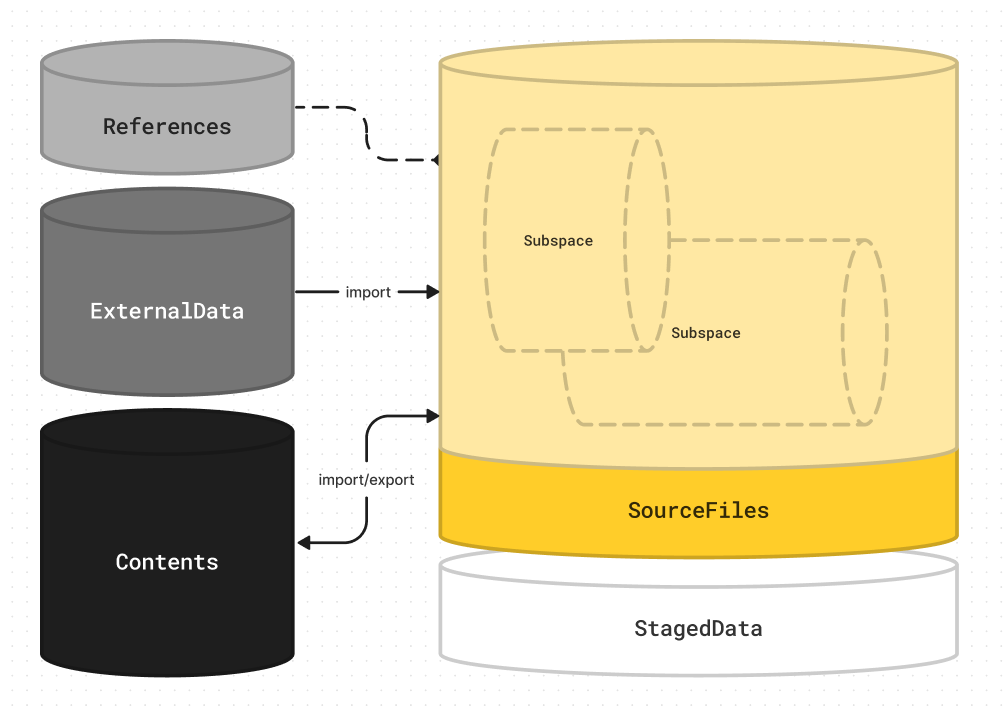
There are only 4 rules, easy to remember:
- Name everything in a clear, specific way
contents/stores static resource filessubspaces/stores dynamic source filesOMOOSPACE.mdrcords project information
1. Name everything in a clear, specific way
-
Avoid special characters and spaces.
Only letters, numbers, underscores(_), periods(.), and hyphens(-) are allowed. -
Use universal, easy-to-understand expressions for naming, avoid abbreviations and codes.
Do not use incomprehensible abbreviations such asBC?TE? -
Action terms can be omitted, but object names must not be.
For example:ModelProp01.blendcan be simplified toProp01.blend, but neverModeling.blend;TestWaterEffect.hipcannot beTest.hip. -
Use prefixes (separated by
_) for context and suffixes (separated by.) for modifiers.
For example:Sc010_Anatomy_Skeleton.high.v001.blend—Sc010andAnatomyare context prefixes;.highand.v001are modifier suffixes. See more examples here: How to use modifier suffixes?
2. contents/ stores static resource files
-
Stores referenced, imported, exported resource files and final deliverables.
Examples: images, videos, audio effects, models, even source files, data files, etc. -
Organize subfolders by resource type
├── contents/
│   ├── audios/       # Audio assets
│   ├── downloads/    # Files downloaded online
│   ├── dynamics/     # Various FX simulations
│   ├── images/       # Textures, image assets
│   ├── models/       # Models, animated models
│   ├── renders/      # Image sequences, rendered videos
│   ├── data/         # Reference data
│   ╰── videos/       # Final videos, video assets
See more examples here: How to set up folders?
-
Do not easily adjust the folder structure or move files arbitrarily.
If adjustments are necessary, use the copy method to avoid losing original references.
3. subspaces/ stores dynamic source files
-
Stores process-recorded source files and software-specific project files.
For examples: .psd, .blend, .word, .ppt. -
Organize files and subfolders by objectives
├── subspaces/
│   ├── Assets/                  # (Prepare) Assets
│   │   ├── Prop01.blend         # Latest version
│   │   ╰── Prop01.v001.blend    # Backup version
│   ╰── Sc010/                   # (Make) Scene 010
│       ├── Sc010.prproj         # (Editing) Scene 010
│       ├── Sc010.blend          # (Layout) Scene 010
│       ╰── TestExplosion.blend  # Test Explosion Effect
See more examples here: How to set up folders?
The
subspaces/folder is optional — source files can be placed directly in the root directory. -
The folder structure can be adjusted arbitrarily, and files can be moved freely.
Messy states are allowed here, including work-in-progress, debugging, pending verification, and unorganized files. -
If a file needs to be referenced, save a copy to
contents/.
Do not reference source files directly from each other to avoid dynamic, disorganized upstream changes affecting downstream files.├── contents/ │ ╰── models/ │ ╰── **Prop01.blend** # Referenced copy ├── subspaces/ │ ├── AssetPreparation/ │ │ ╰── Prop01.blend # Working file │ ╰── Scene010.blend # File that needs referencesIf
Scene010.blendneeds to referenceProp01.blend, copyProp01.blendtocontents/. See details here: How to back up copies?
4. OMOOSPACE.md records project information
Use OMOOSPACE.md to record overall project information.
---
description: An awesome IP project
notes:
  Client: Tencent
makers:
  Omoolab: studio@omoolab.xyz
tools:
  Blender: 4.2.0
  Houdini: 20.0
works:
  AwesomeProp01: models/Prop02.glb
  AwesomeShort01:
    description: An awesome animated short
    version: "1.0.0"
    contents:
      - videos/Short01.mp4
      - images/Short01_Cover.png
---